

You can picture the storefront: clean product photos, an "Add to cart" button, a tidy checkout. What you cannot see is everything behind it that has to agree, the part that knows the price is right, the item is in stock, the payment cleared, and that someone now has to ship a box. That hidden half is where most first stores fall apart.
In short, an online store is a system that shows products in a catalog, lets shoppers collect them in a cart, takes payment securely at checkout, and records the order so it can be fulfilled. Everything else is detail bolted onto those four jobs.
You have seen this anchor a hundred times: every time you add something on Amazon, watch the cart count tick up, and breeze through checkout with a saved card, you are watching those four systems hand off to each other.
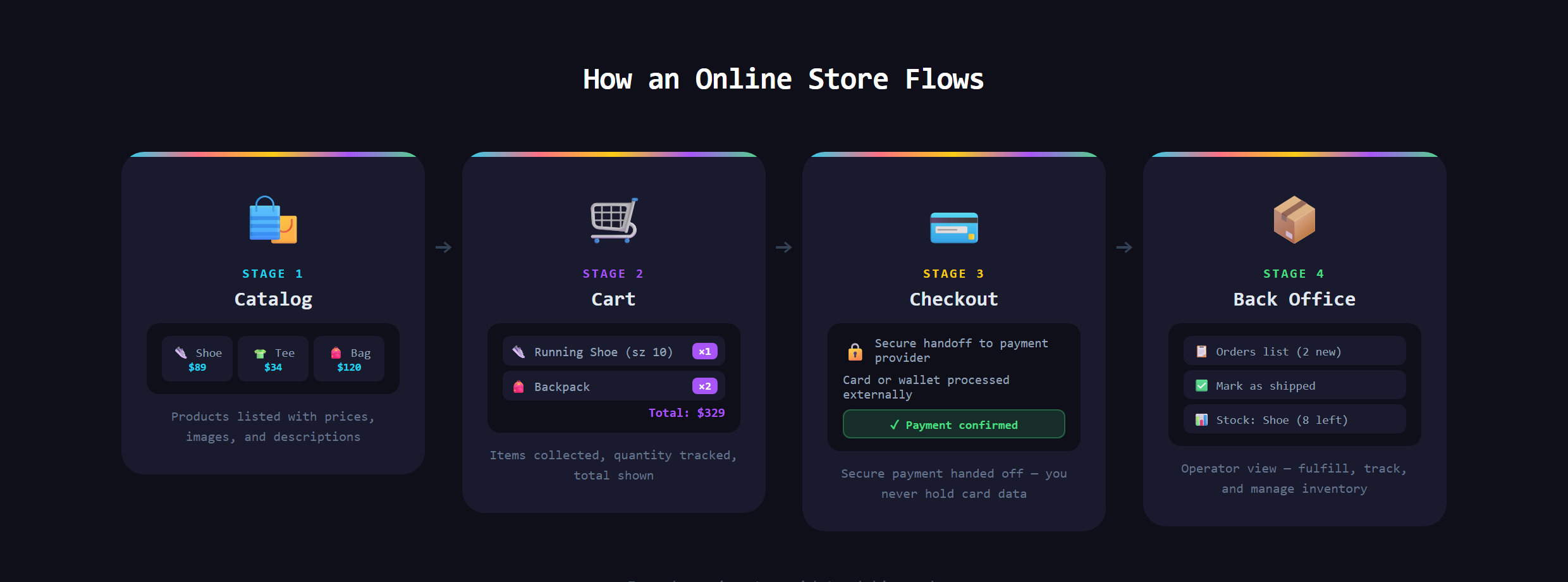
What are the four parts of a store?
- The catalog: your products, with prices, descriptions, images, and variants like size and color. It is really a database of things you sell, and those product photos live in file storage.
- The cart: a temporary holding pen that remembers what a shopper picked while they keep browsing.
- The checkout: where money changes hands. This is the part you never build from scratch, because handling card data safely is a regulated, already-solved problem (more on how apps take payments).
- The back office: the admin view where you see orders, mark them shipped, and watch stock. Every real store has one.
Why is checkout the part you never reinvent?
Touching raw card numbers means a mountain of security and legal rules most builders should never go near. So real stores hand checkout to a dedicated payments provider that takes the card, clears it, and hands your store back a simple paid confirmation. You get the money and the safety without ever storing a card yourself. Knowing how that handoff works, and the few ways apps actually charge, is its own piece of the puzzle.
Digital goods or physical goods?
This one choice changes the whole build. A physical store has to track stock, calculate shipping, handle returns, and tell a warehouse to send a box. A digital store (selling templates, courses, downloads, e-books) skips every one of those: effectively infinite inventory, instant delivery, no shipping. That is why a digital product is almost always the smarter first store to build, and a perfect fit for the way Make Anything With AI teaches you to ship fast. Fewer moving parts, and the hard parts (payment, delivering a file) are the same ones you would learn anyway.
How does a store stay organized as it grows?
Two things quietly run a healthy store: search and inventory. Once you have more than a handful of products, shoppers need to find things fast, which is where real product search earns its keep. And the store has to know what is actually available, so it never sells the last unit twice. Underneath it all, every product, order, and customer is just structured data the store reads and updates constantly.
What makes a good store versus an abandoned cart?
The best stores remove friction. Clear photos, honest prices, a checkout that does not force you to create an account just to spend money, and a sense of trust (a real domain, a clean favicon, no sketchy redirects). Most lost sales happen at the very last step: a confusing or slow checkout, a surprise shipping cost, a form that asks for too much. A good store treats the final ten seconds as sacred.
What goes wrong?
The common failures are predictable. Building a beautiful catalog and bolting on a clumsy checkout that loses people at the finish line. Forgetting the back office, so orders pile up with no clean way to fulfill them. Trying to handle payments or card data directly and inheriting a security nightmare. Or picking a physical product for a first build and drowning in shipping and stock before the store even works. A store is not a page of products. It is a pipeline from browsing to paid to delivered, and every stage has to hold.
Turning a product idea into a real store, the catalog, the cart, the secure checkout, and the back office that runs it, is covered in Venom AI's Tier 3. Learn the four parts and the whole thing stops feeling like magic.