

Your app has five hundred items and a tidy little search box. A user types "blue running shoe" and gets nothing back, because the product is filed under "Azure Sprint Trainer." A search box that returns nothing is worse than no search box at all, because now the app looks broken on top of unhelpful.
In short, app search is how software finds the right records out of thousands in a split second, and there are three main flavors (keyword, full-text, and semantic) that each understand your query in a very different way. Picking the wrong one is why so many in-app searches feel useless.
Why is search harder than it looks?
A search box looks like the simplest thing on the page, but human language is messy. People misspell things, use synonyms, type half a thought, or describe what they want instead of naming it. On top of that, finding matches is only half the job. The app also has to rank them, so the best answer sits at the top instead of buried on page four. You have seen the gold standard every time Google turns "that movie with the spinning top" into Inception. That is a search engine understanding intent, not just letters.
Keyword vs full-text vs semantic: what is the difference?
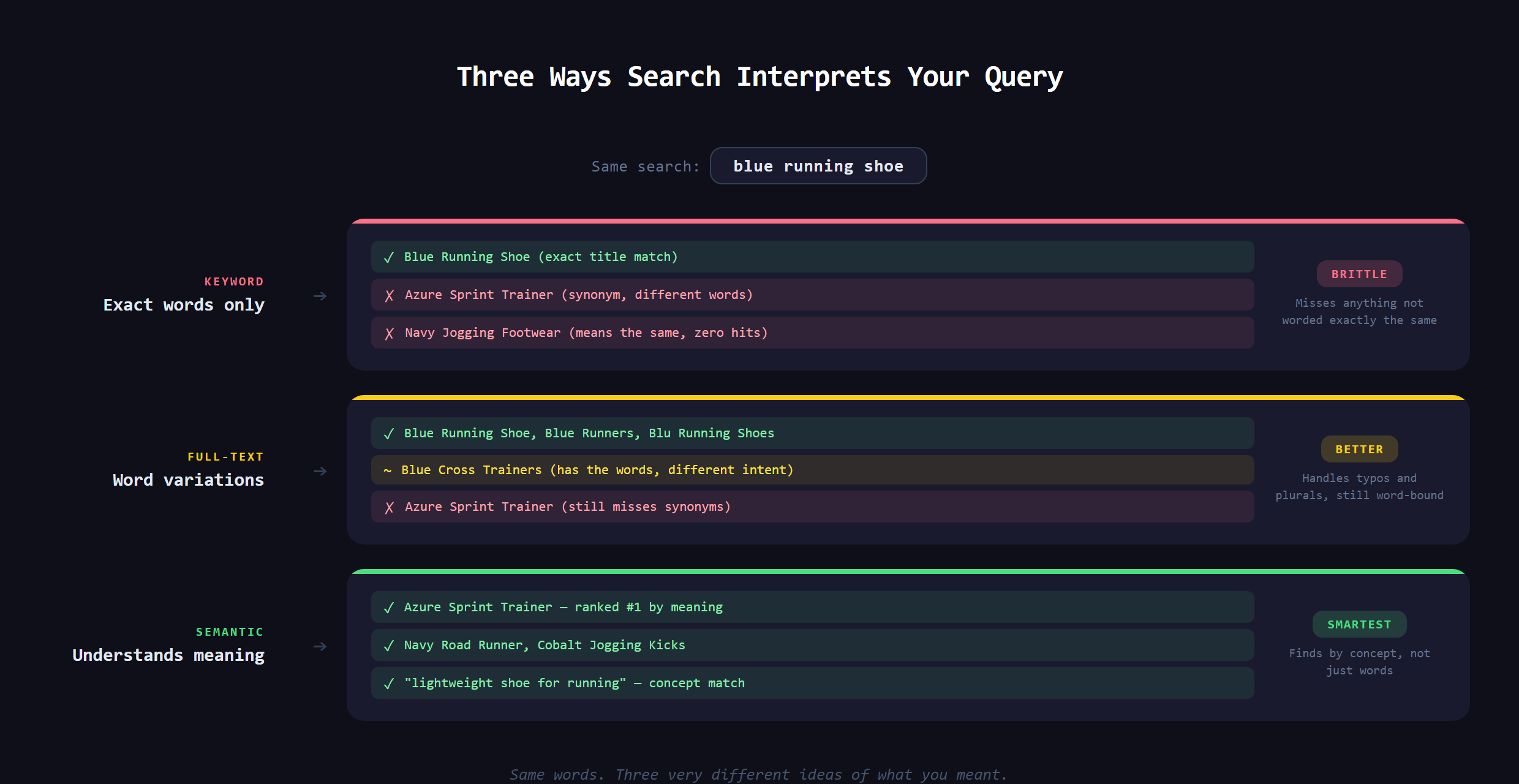
The three flavors are really three levels of understanding:
- Keyword (exact match): looks for the literal characters you typed. Fast and simple, but brittle. One typo or a synonym and it finds nothing.
- Full-text:understands words and their variations, so "running" can match "run," and it ranks results by how relevant they are. This is what most real apps use.
- Semantic: understands meaning, not just words. Powered by AI, it can connect "blue running shoe" to "Azure Sprint Trainer" because it grasps that they describe the same thing.
Which one do you actually need?
Most apps do not need the fanciest option. Full-text search handles the large majority of real cases well and is the sensible default. Semantic search earns its keep when meaning matters more than exact wording, like a help center where people describe a problem in their own words, or any of the AI-flavored features that have become normal lately. It is also the engine behind a lot of "ask your documents a question" tools.
What goes wrong with bad search?
Weak search quietly kills products. People assume that if they cannot find a thing, it is not there, so they leave. An online store with bad search loses sales it already had in stock. A content site with bad search buries its best work. The cruel part is that the data was right there the whole time. The search just could not bridge the gap between what the user typed and how the record was written.
What separates good search from bad?
Beyond which flavor you pick, a few things decide whether search feels great or merely present. Speed is the big one: results that appear as you type feel like magic, while a two-second spinner feels broken. Typo tolerance matters too, so "recieve" still finds "receive" instead of a dead end. Then there are filters and facets, the little checkboxes that let someone narrow a huge result set by price, category, or date. None of these change what search is, but together they decide whether people trust the box enough to keep using it, or give up and leave.
Why does this matter when you build with AI?
Here is the freeing part. You do not write a search engine from scratch. The job is choosing the right type for what you are building and wiring in a tool that provides it, which an AI assistant in VS Code can help you do once you know what to ask for. If the words keyword, full-text, and semantic mean nothing to you, you cannot make that call, and you end up with the search box that returns nothing. Owning that vocabulary is exactly how we teach people to Make Anything With AI.
Choosing and adding search that actually finds what people mean, including the semantic kind, is covered in Venom AI's Tier 2. Get search right and your app finally feels like it understands the person using it.