

You build a signup form, someone types in their name, and they hit submit. The page reloads, and the name is gone. It went nowhere, because you never gave your app a place to remember things. That blank-after- reload moment is where most builders first realize their app has no memory at all.
In short, a database is your app's long-term memory: an organized place where every account, post, order, and setting is stored so it is still there after the visitor closes the tab. Without one, your app forgets everything the instant the page refreshes.
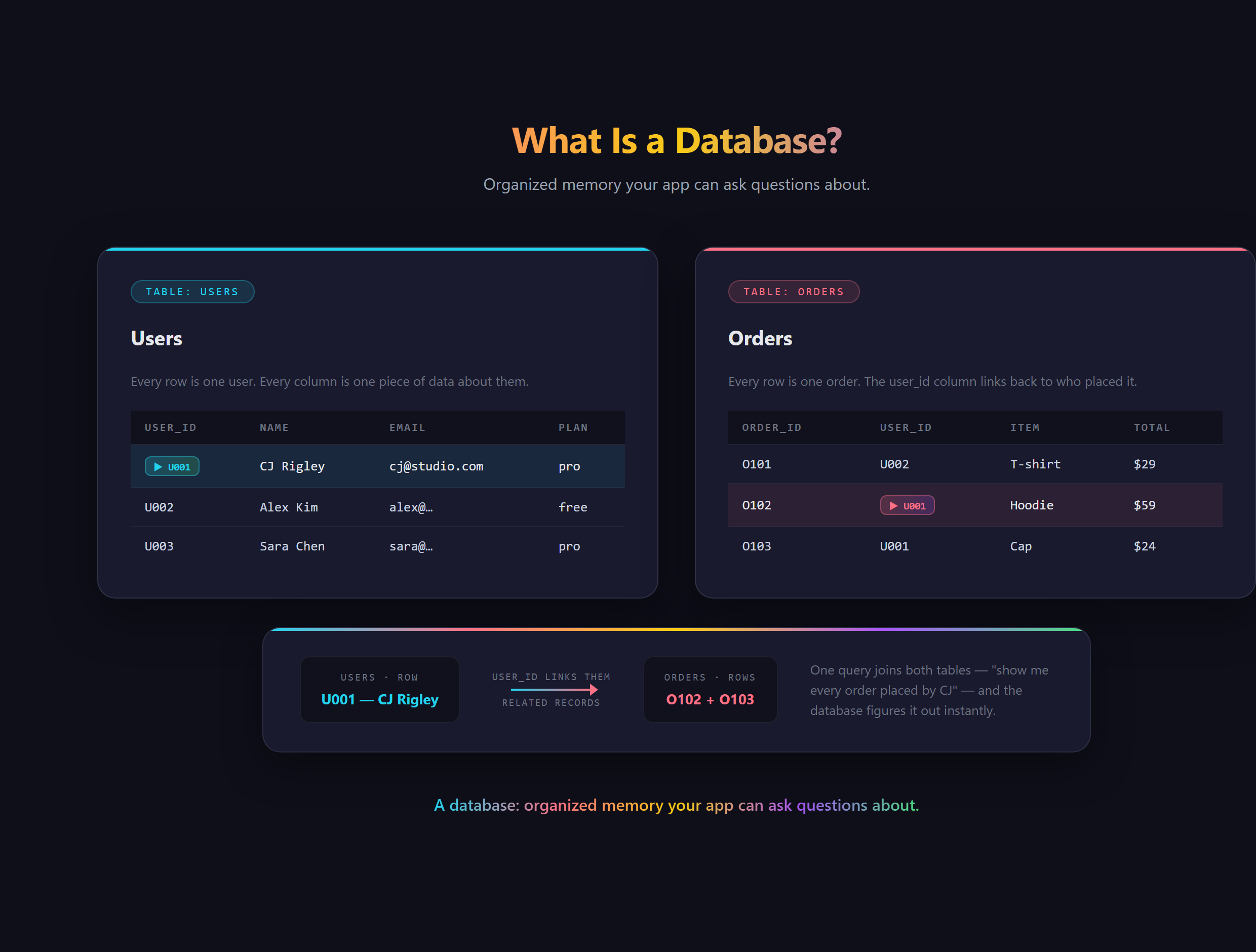
What is a database, really?
Picture a very disciplined filing cabinet. Information goes into labeled groups (often called tables or collections), each entry sits in a predictable spot, and the whole thing is built so your app can find any record in a blink. You have seen the payoff every time you log into Spotify on a brand new device and all your playlists are right there waiting: a database quietly handed them back to you. That is the entire job, remember the stuff and give it back on demand.
How is it different from a spreadsheet?
On the surface they look alike: rows, columns, cells. The difference is who they are built for. A spreadsheet is for a human to open and stare at. A database is for an app to read and write hundreds of times a second without falling over, and to answer precise questions instantly ("every order from this one customer, newest first"). It also understands relationships, so a user can be connected to their orders, and their orders connected to products, all without copying the same information everywhere.
SQL vs NoSQL: what is the difference?
You will run into these two words fast, and they are less scary than they sound. SQL databases keep data in strict tables with defined columns, which is great when your information has a clear, steady shape. NoSQL databases store more flexible documents grouped into collections, which is often friendlier when an app is changing quickly. Firestore, the database inside Firebase, is a popular NoSQL option and a common first stop for new builders. Neither is "better." They are two ways to organize the same idea.
What does it actually mean to "store data"?
Almost everything an app does with a database boils down to four moves: create a record (a new signup), read it back (show the profile), update it (change the email), and delete it (close the account). That is the full loop, and once you see it, nearly every feature you can imagine is just some combination of those four happening to different kinds of records.
The quiet superpower on top of that is asking questions across all of it. A database can hand back every order over fifty dollars from the last week, sorted and counted, in a blink. That ability to slice and filter your data on demand is what turns a plain pile of records into something an app can actually reason about and act on.
What goes wrong without one?
Skip the database and you get an app that looks finished while doing nothing real. Forms submit into the void. Nobody can log back in, because there is nowhere an account could live. Two people can never share anything, because there is no common place to keep it. A database is the dividing line between a pretty page and an actual product, which is why it is one of the first real building blocks every serious app needs.
Why does this matter when you build with AI?
Here is the freeing part. You do not have to hand-design tables or write a line of query language to begin. With an AI assistant in VS Code you can describe what your app should remember in plain English and have the structure built for you. But you still have to know what to ask for. If the words table, collection, and record mean nothing to you, you cannot describe the memory your app needs, and the AI cannot guess it. Owning that vocabulary is exactly how Venom AI teaches people to Make Anything With AI.
Designing the right data structure for your app, and wiring it in so it actually remembers, is covered in Venom AI's Tier 2. Learn to picture your app's memory, and you will never lose a signup to a page reload again.