

The moment you let a user pick a photo from their phone and watch it appear in your app, the thing stops feeling like a toy and starts feeling real. But a file is not like a line of text in a form, and that is exactly where new builders get stuck: you hit submit and have no idea where the picture is supposed to actually go.
In short, a file upload is the process of moving a file (an image, a PDF, a video) from a user's device to your app's storage, then handing back a link your app can use to show that file again later. The file goes one place; a small address pointing to it goes somewhere else.
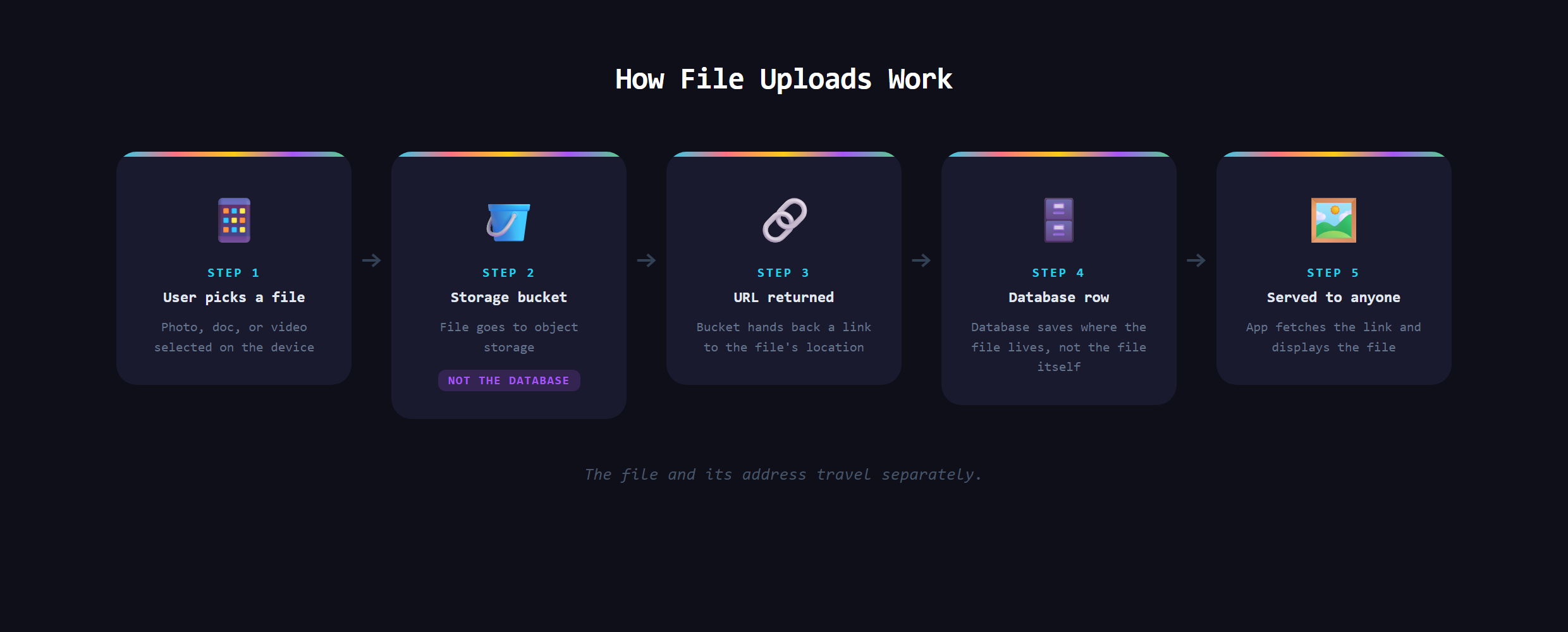
Why are files different from regular data?
Text is tiny and tidy. A name, an email, a message: those drop straight into your database as small, neat records. A file is the opposite. It is big, it is binary, and it can be thousands of times larger than the rest of a record combined. Treat a video like just another form field and things get slow and expensive fast. So apps handle files on a separate track built for exactly that.
What is object storage, and why not the database?
That separate track is called object storage: a service designed to hold files cheaply and serve them quickly over the web. Firebase Storage and Amazon S3 are two you will hear about. The pattern is always the same. The actual file lives in storage, and your database keeps only a short link pointing to it. The database stays small and fast; the heavy lifting happens where it belongs.
What actually happens during an upload?
From the outside it looks like one click. Underneath, it is a short round trip. The user picks a file, it travels up to object storage, storage hands back a web address for it, and your app tucks that address into the right database record. Later, when anyone needs to see the file, the app reads the address and loads it. You have seen this every time you change your profile picture on Instagram and it instantly shows up everywhere: that is the upload-store-link-display loop running in under a second.
Good apps rarely stop at storing the raw file either. A giant phone photo usually gets shrunk into smaller versions so pages load fast, and files are served from a network of servers sitting close to the user. You never notice any of that happening, which is exactly the point of a well-built upload.
What goes wrong with uploads?
This is the part people underestimate, because the failure modes are sneaky:
- Size: someone uploads a 200-megapixel photo and the page chokes, or your storage bill creeps up.
- Wrong type: you expected an image and got a random file your app has no idea how to display.
- Security: an upload box is a door into your app, and an unguarded one can be abused to push up something harmful.
- Broken links: the file moves or never finished uploading, and now your app points at a picture that is not there.
Every one of those is preventable with validation, checking the size and type before you ever accept the file. Skipping it is how a simple "add a photo" feature turns into a real problem.
Why is this trickier than it looks?
A file upload touches three things at once: the user's device, object storage, and your database, and they all have to agree. That is more moving parts than a normal form, which is why uploads feel like a leap up from your first pages. The reassuring news is that with an AI assistant in VS Code you do not wire all of that by hand. You describe the feature you want and direct the build. But you have to understand the journey (file to storage, link to database) to ask for it correctly and spot when something is off. That kind of clear mental model is what Venom AI is built to give you, part of how we teach people to Make Anything With AI.
Adding real file uploads to an app, the secure way with the storage and links set up correctly, is covered in Venom AI's Tier 2. Once your app can take in photos and documents, it crosses the line from a demo into something people can genuinely use.