

You want it on a phone. Maybe even in the App Store. And the moment you start reading, you drown in jargon: native, React Native, Flutter, PWA, Swift, Kotlin, and ten loud opinions about which one is "real." The truth is a lot calmer than the internet makes it sound.
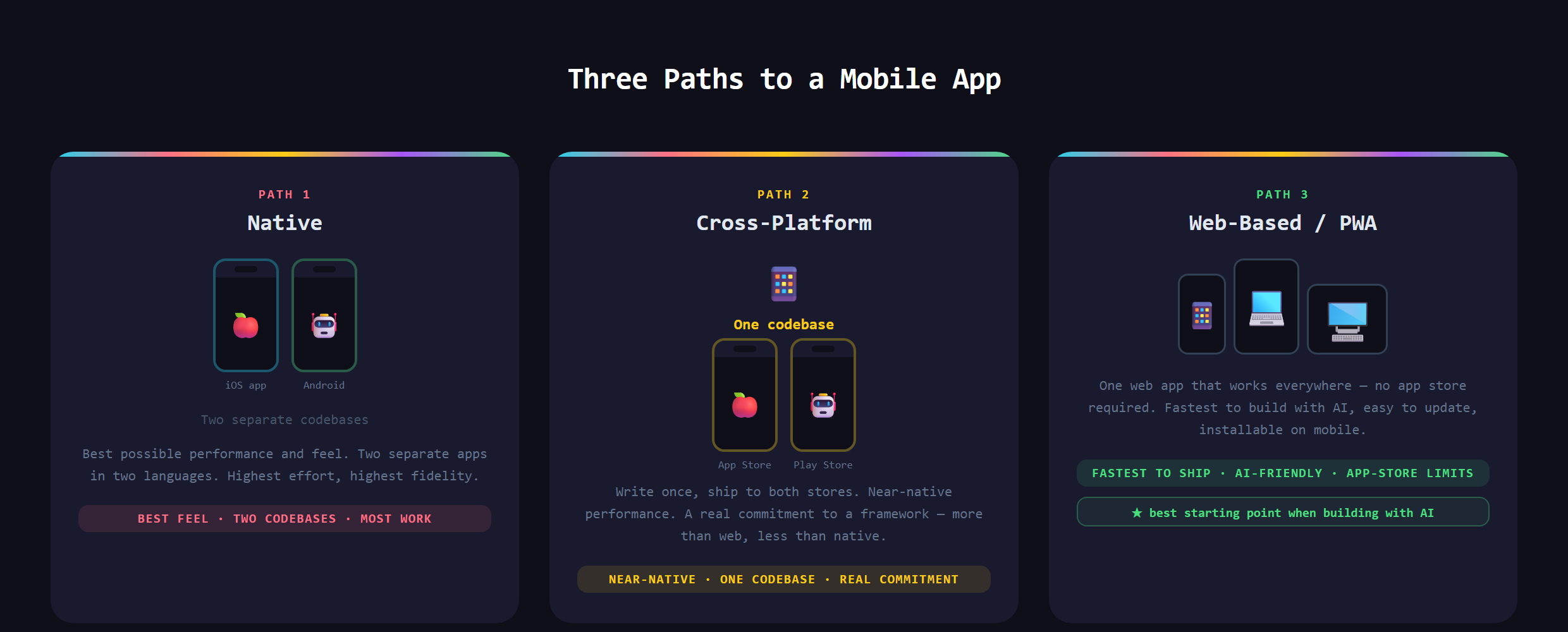
In short, there are three ways to build a mobile app: native (built separately for iOS and Android), cross-platform (one codebase that ships to both stores), and web-based (a website built to look and feel like an app on any phone). Each one trades effort for control differently.
Here is the part nobody tells you: some of the apps on your phone right now are quietly web apps in a thin native shell. You would never know, and that is exactly the point.
Path one: native
Native means building twice, once for iPhone in Apple's tools and language, once for Android in Google's. You get the best possible performance, the smoothest feel, and full access to every device feature (camera, sensors, notifications). The cost is real: two codebases, two skill sets, and two sets of updates forever. Native is the right call for graphics-heavy games or apps that lean hard on device hardware. For most first apps, it is far more than you need.
Path two: cross-platform
Cross-platform tools (React Native and Flutter are the big two) let you write one codebase that compiles to both the iOS and Android stores. You get most of the native feel for roughly half the work, which is why even huge companies use them. The tradeoff is an extra layer of complexity and the occasional moment where you still have to drop into platform-specific territory. It is a great middle path, but it is a real engineering commitment, not a shortcut.
Path three: web-based
The third path is a responsive web app: a website built so well that on a phone it looks and behaves like an app. Add a few modern touches and it becomes a PWA (progressive web app) that installs to the home screen, works offline, and can send notifications, no app store required. You can even wrap it in a thin native shell later to get into the stores. One codebase covers phones, tablets, and desktop at the same time.
Which one is best when you build with AI?
Here is the honest answer: for most people starting out, the web-based path wins, and it is not close. AI assistants are strongest at web technology (the HTML, CSS, and JavaScript the whole web runs on) because that is what they have seen the most of. So in VS Code, with an AI assistant beside you, you move fastest on a web app, and everything you already know about building a website carries straight over. You skip store approval to launch, you update instantly, and one codebase serves every device. Build the web app first, prove people want it, and graduate to native or cross-platform only when you hit a real wall. That sequence, ship the simple version, earn the right to build the hard one, is the whole spirit of Make Anything With AI.
When is the web path the wrong call?
Be honest about the limits. If your app is a fast-twitch 3D game, leans on deep hardware (advanced camera work, Bluetooth devices, background tracking), or absolutely must be discovered by people browsing the App Store, a web app will fight you. App stores also place limits on what a wrapped web app is allowed to do. For a huge share of real apps though, a tool, a tracker, a marketplace, a community, none of that applies, and the web path gets you live in a fraction of the time. Most of those apps still need a backend to store data, which is where something like Firebase comes in regardless of the path you pick.
What goes wrong?
The classic mistake is starting native because it sounds the most legitimate, then burning months maintaining two codebases for an app nobody has validated yet. The opposite mistake is forcing a web app to do something it is genuinely bad at and then blaming the tools. The fix is matching the path to the job: most first apps should be web apps, the proven winners earn a native build later, and only a specific few need native from day one. The platform is a decision, not a default.
Choosing the right path and building a real, mobile-ready app, without two codebases and an app-store headache, is covered in Venom AI's Tier 3. Pick the path that fits the job, not the one that sounds the most impressive.