

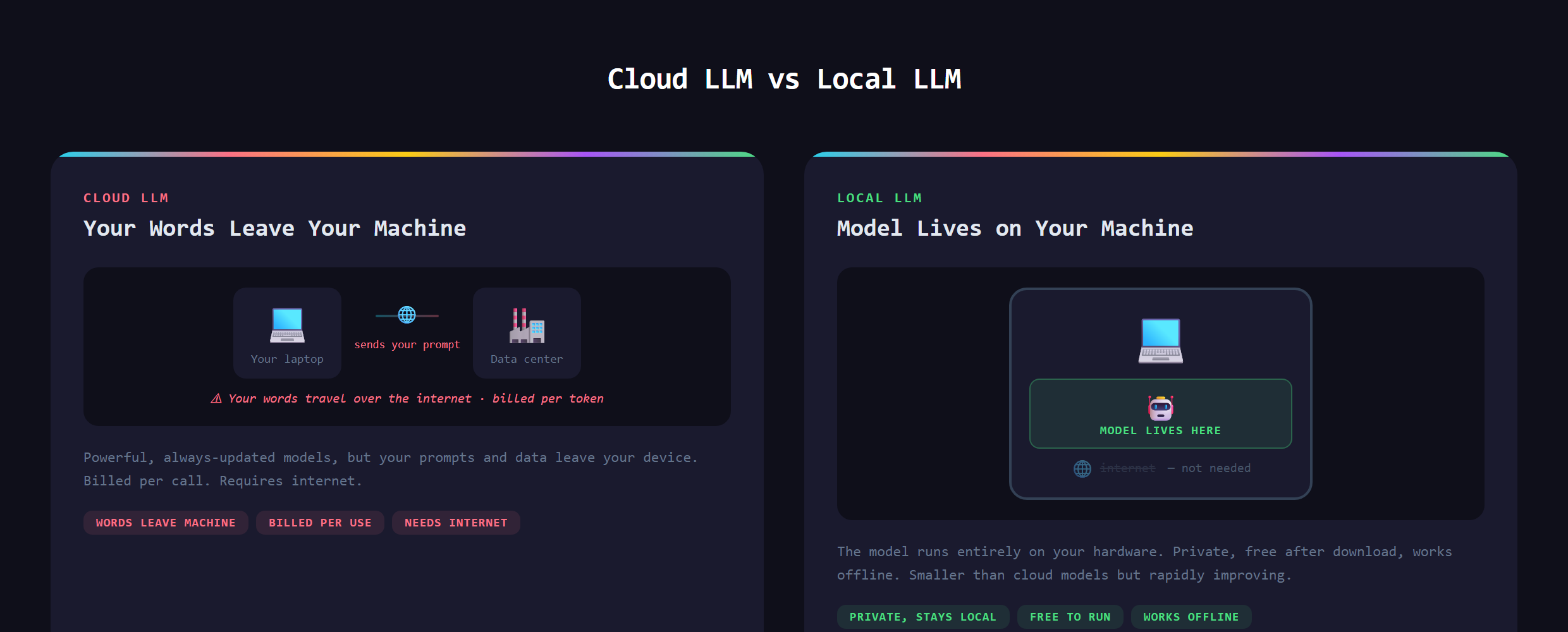
Every time you use a cloud AI, your words travel to someone else's servers, get processed there, and you pay per use. For a lot of work that is fine. But the moment you want privacy, no usage bills, or AI that runs on a plane with no wifi, you start wondering whether this thing could just live on your own computer. It can.
In short, a local LLM is a large language model that runs entirely on your own hardware (your laptop or desktop) instead of in a company's cloud. The AI lives on your machine, so your prompts and your data never leave it.
You have seen the cloud version every time you use a chat AI in a browser. A local LLM is that same idea of a capable AI assistant, except the brain is sitting on your own drive instead of in a distant data center.
What does "local" actually change?
Three things flip the moment the model runs on your machine:
- Privacy: nothing you type is sent anywhere. For sensitive work (legal, medical, personal, proprietary code) that alone is the whole appeal.
- Cost: there is no per-use bill. Once it is on your machine, running it is free, as much as you want.
- Offline: no internet required. It works on a plane, in a cabin, anywhere.
The catch sits on the other side of that trade, and it is real.
Can you really run one on a normal laptop?
Yes, and that is the part that surprises people. There are now free, friendly tools that download an open model and run it on your computer with almost no setup. A reasonably modern laptop can run a capable model; a machine with more memory and a decent graphics chip runs larger ones faster. You do not need a server farm. You need a normal computer and the right tool, and the open-source community has made that part genuinely easy.
What is the tradeoff versus cloud AI?
Here is the honest part. The enormous models from the big AI labs run in data centers full of specialized hardware for a reason: they are huge. The models you can run locally are smaller, which makes them generally less capable, especially on the hardest reasoning. For everyday tasks (drafting, summarizing, answering questions, light coding help) a good local model is more than enough. For the absolute frontier of difficulty, the cloud still wins. Knowing which jobs to send where is the actual skill.
Where do open models come from?
This is one of the quiet revolutions in AI. A number of organizations release "open-weight" models: the trained model itself is published for anyone to download and run. That is what makes local AI possible at all. It also means the gap between local and cloud keeps shrinking, because every new open release raises the floor of what your own laptop can do. We watch this space closely at Make Anything With AI, because a capable model you fully own changes the math on a lot of projects.
Why would a builder want one?
Beyond privacy and cost, owning the model unlocks things a rented one cannot. You can run it constantly without watching a meter, which is perfect for background jobs that would be expensive in the cloud, and a natural fit once you start adding AI to your apps. You can build products that work with no internet. And you can promise users that their data never leaves their device, which for some apps is the entire selling point. A local model turns AI from a service you rent into a component you own.
What goes wrong?
The usual mistakes: expecting a laptop model to match the biggest cloud model and feeling let down (wrong tool for that job), or trying to run a model far too large for your hardware and watching it crawl. The fix is matching the model to your machine and your task. Start with a smaller model, see how it handles your real work, and size up only if you need to. A local LLM is not a weaker chat AI. It is a different tool with a different set of superpowers.
Running your own local LLM, choosing the right model for your hardware, and wiring it into real projects, is covered in Venom AI's Tier 4. Once the model lives on your machine, a lot of what felt out of reach suddenly is not.