

Here is the moment that trips up almost every new builder. You can picture exactly what you want in your head, but when you go to ask the AI for it, the words come out as "make it look, you know, cleaner, with the thing at the top." The AI does its best, guesses, and hands you something that is close but not it. The problem is not your taste. It is that you do not yet have the words.
In short, web design vocabulary is the small set of names for the parts of a page and the way they are arranged, and it is the single biggest upgrade to how well an AI understands what you actually want.
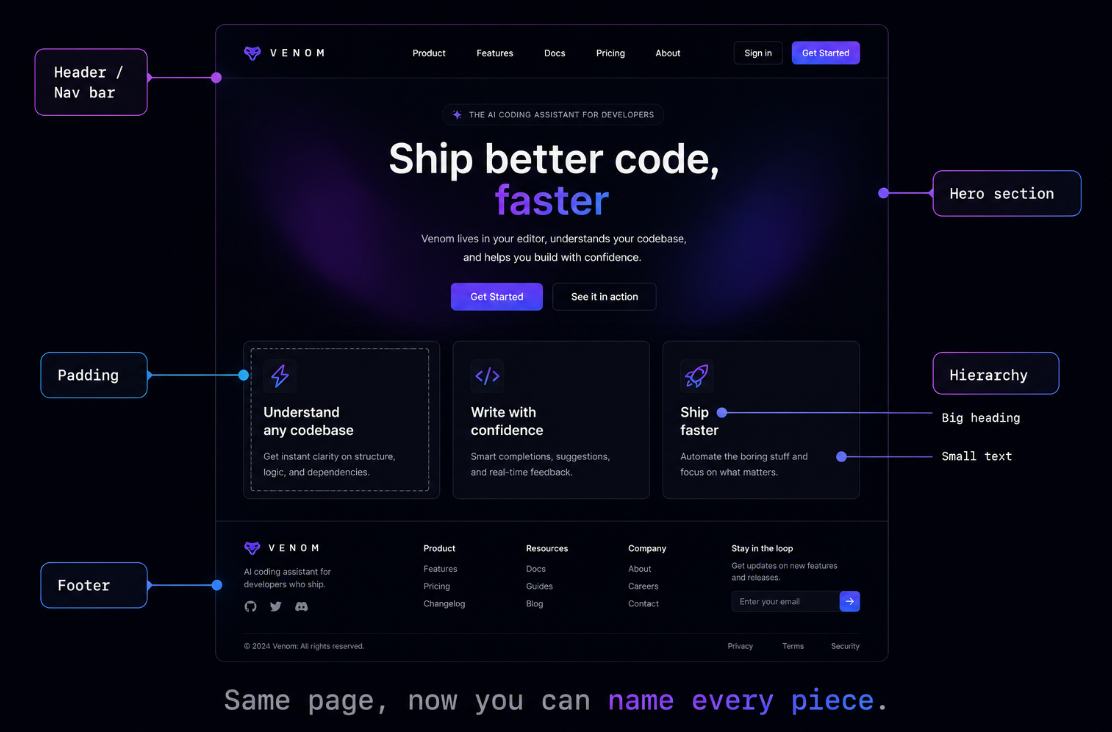
Why words beat taste when you build with AI
You have great instincts already. You can walk into a website and feel instantly whether it looks expensive or cheap, trustworthy or sketchy. That instinct is real, but it is locked up until you can put it into language. An AI assistant cannot see the picture in your head. It can only act on the words you give it, so the richer your words, the closer the result.
Think of it like ordering at a great kitchen. "Make me something good" gets you the chef's guess. "A medium-rare steak with a peppercorn sauce" gets you exactly what you wanted. The food was always possible. The order is what changed. Web design terms are how you place a precise order.
What kind of words are we talking about?
They fall into a few natural buckets, and you already half-know most of them from using the web every day:
- The parts of a page: the bar across the top is a header, the big welcome banner is a hero section, the links that move you around are navigation, and the strip at the bottom is a footer. Name them and you can move them.
- Space and arrangement: padding is the breathing room inside an element, margin is the gap between elements, and alignment is how things line up. Most of what makes a page feel professional is just space used well.
- Visual hierarchy: the idea that the most important thing should look the most important. Big bold heading, smaller calmer body text. It is why your eye knows where to go.
- Style words: contrast, accent color, rounded corners, drop shadow. Tiny levers that change the entire mood of a page.
None of these are code. They are just names for things you have looked at a thousand times without having a word for. The minute you do, you can point at any site and describe what you would change.
You have seen this everywhere
Open almost any polished site and the same skeleton is there: a header with navigation, a hero section that states what this is, a few sections with generous padding, and a footer. Once you have the words, you start seeing the pattern under every page on the internet, and copying what works becomes a matter of asking for it by name.
What goes wrong without the vocabulary
Without the words, every request becomes a guessing game. You ask for "more space," but you meant padding inside the card, so the AI adds margin around it and now it looks worse. You go back and forth five times to get something a single correct word would have nailed in one. It is slow, it is frustrating, and it makes people quit thinking they have no eye for design, when really they just had no dictionary.
The full working vocabulary, the eighty-plus terms that let you describe any layout, style, and interaction precisely enough for AI to build it right the first time, is taught in Venom AI's Tier 1. It is one of the quietest superpowers in the whole course, because clear words are how you Make Anything With AI without fighting the tool the entire way there.