

Here is a trap almost every new builder falls into. You add a contact form, it looks perfect, you type a test message, you hit send, and... nothing. No email, no confirmation, the message just vanishes into the void. The boxes were the easy part. What happens after submit is the actual form, and it is where a site goes from looking interactive to being interactive.
In short, a web form is how a site collects input from a visitor and then does something real with it, checking the input is valid and then saving it, sending it, or both.
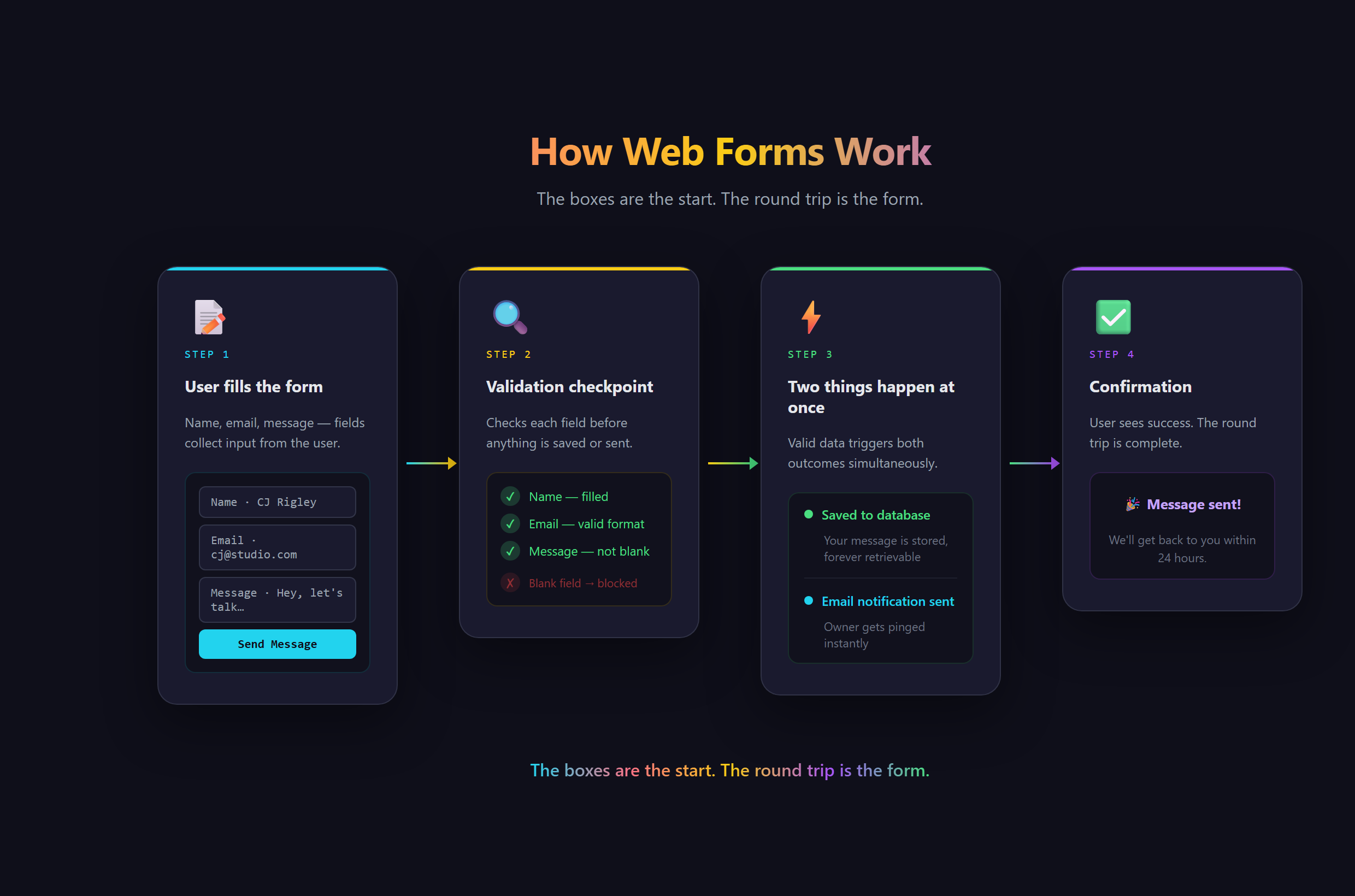
The boxes are the smallest part
The visible form, the name field, the email field, the message box, the submit button, is the part beginners obsess over, and it is genuinely the least interesting bit. Those fields are just a way to collect what someone wants to tell you. The real work is the round trip: take what they typed, make sure it makes sense, and then carry it somewhere it matters. A form with beautiful fields and nothing wired behind submit is a mannequin. It looks like the real thing and does none of the job.
You have used thousands of these without thinking about it. Every signup, every login, every contact box, every checkout, every search bar is a form. The entire interactive web is basically people filling in fields and sites doing something useful with the result. Once you see that, forms stop being a small feature and start looking like the doorway to everything an app actually does.
Validation: catching problems before they bite
Validation is the quiet hero of a good form. It is the set of checks that make sure the input is usable before it goes anywhere: a required field is not blank, an email address actually looks like one, a phone number has the right shape. Done well, validation talks to the user in the moment, gently flagging the problem and pointing at the fix, so they sail through instead of getting a cryptic error after the fact. It is the difference between a form that feels trustworthy and one that feels held together with tape.
There is a less obvious reason validation matters. Without it, garbage flows straight into your records: blank entries, fake emails, half-filled submissions you can do nothing with. Good input on the way in is what makes everything downstream actually work.
Notifications: making the input matter
The other half is what happens after a valid submission. Usually that means a notification, an email landing in your inbox the second someone reaches out, and a saved record so nothing is ever lost. This is the part that turns a form from a gesture into a real channel. A contact form that actually emails you is a way for customers to reach you. One that silently drops messages is worse than no form at all, because people think they reached you when they did not. Wiring up that round trip cleanly is exactly the kind of thing we teach at Venom AI.
What goes wrong when the round trip breaks
The failure mode is invisible and brutal. The form looks finished, so you assume it works, and meanwhile real people are sending messages that go nowhere. Or there is no validation, so your records fill with junk you cannot use. Or there is no confirmation, so users submit twice, unsure it worked. Every one of these is a form that exists but does not do its job, and the visitor pays for it with a bad experience you never even see.
How to build forms that validate input cleanly and actually deliver, with your AI assistant wiring up the notifications and storage in VS Code, is walked through step by step in Venom AI's Tier 1. Forms are where your site starts truly doing things, and getting them right is a core part of learning to Make Anything With AI.